
OrderInOne Brand Guide
Version 2.0 | 12 September 2026 | Android operator app, golfer web ordering and client website
This guide defines the shared identity for OrderInOne. It preserves the supplied logo and distinguishes observed product behaviour from the recommended visual system. It supersedes the July 2026 guide for new marketing work; existing app screens have not been restyled as part of this task.
Positioning
Order ahead. Arrive ready. OrderInOne is golf-course QR ordering software that connects a golfer’s mobile browser with the venue’s Android order queue. Golfers choose food and drinks before reaching the halfway house. Staff receive structured orders and manage preparation and handoff.
The intended experience is clear, welcoming and composed. Lead with the service moment at the turn. Do not promise that food will always be ready at a particular time: readiness depends on the venue.
For golfers: a course menu, familiar choices and a clear next step. For operators: readable orders, menu control and clear transitions. For club decision-makers: a practical way to coordinate ordering and preparation.
Naming and logo
Always write OrderInOne, with capital O, I and O, without spaces. Use “OrderInOne operator app” and “OrderInOne web ordering” when the distinction helps. Golfers use a browser; do not imply that they need to download the Android operator app.
The existing mark and wordmark remain the primary identity. Use the supplied artwork intact. Do not retype the wordmark, stretch it, recolour individual parts or add effects. Use white or a quiet, high-contrast field around the logo. The React sample logo in the web source is not brand artwork.
Recommended clear space: one quarter of the symbol’s width. Recommended minimum symbol width: 32 CSS pixels. Check the visible artwork at its final size; the supplied JPEG contains substantial white margins. Do not infer visible-logo size from the image element’s width.
Source assets: OrderInOne-Android/19thHoleTablet/app/src/main/res/drawable/logo.jpg and app/src/main/ic_launcher-playstore.png. There is no approved vector master in the inspected source assets. Retain these originals and commission vector/reverse/monochrome artwork before high-resolution print production.
Colour system
Burgundy#87212E
Ink#0F172A
Mist#F8FAFC
Success#166534
| Role | Value | Use |
|---|---|---|
| Shared primary / web burgundy | #87212E | Main calls to action, focus and selected states |
| Android primary observed | #A7192B | Existing Android theme; not silently migrated |
| Primary hover | #681A25 | New marketing website hover state |
| Product ink | #0F172A | Product headings and text |
| Product body | #334155 | Product body text |
| Muted text | #64748B | Secondary text on white |
| Mist | #F8FAFC | Product canvas |
| Border | #E2E8F0 | Product separators |
| Success | #166534 | Accessible success text |
| Success tint | #DCFCE7 | Status background |
| Warning | #B45309 | Attention needed |
| Error | #B91C1C | Failed or destructive actions |
The new marketing website adds editorial Ink #182221, muted text #596460, paper #F7F8F6, course green #24493D and dividers #DCE1DC. These support photography; burgundy remains the action colour. These are explicit marketing additions, not claims about current app tokens.
Use status labels as well as colour. Brand burgundy must not be the only way an error is identified. The brighter legacy greens in the apps are observed accents; prefer the darker success token for small text on white.
Typography and composition
Inter is the shared product typography recommendation, already named in the web Tailwind configuration. Use locally hosted licensed font files when available. The new static site uses an Inter/Arial/system fallback stack; it does not call a third-party font service. Android currently retains its native Material typography.
Recommended weights: 400, 500, 600 and 700. Marketing may use a restrained Georgia italic accent in a short headline; body copy, prices, navigation and app controls remain sans serif. This editorial accent is a new marketing treatment.
Body text: 16-18 px; normal labels: 14 px; secondary metadata: 12-13 px. Website display: 42-65 px, responsive; section headings: 34-48 px. Product titles: 28-32 px. Keep comfortable line height, short paragraphs and tabular price numerals. Use sentence case.
Use a 4 px spacing unit with 8, 12, 16, 24, 32, 48 and 64 px steps. Product cards use 12-16 px corners; main controls use at least 44 px touch targets, with 48 px preferred. Marketing has open columns and generous spacing. Do not make operators scan decorative whitespace to find the next action.
Android operator app
The operator app is the working surface. Prioritise menu item names, quantities, required options, special instructions, golfer details and order status. Course identity should remain visible while the action region is easy to scan.
Menu setup: create categories, add menu items with accurate prices, select the category, then set active/on-course availability. Required and optional extras must be explained before saving. Deactivate unavailable items rather than implying they can still be prepared.
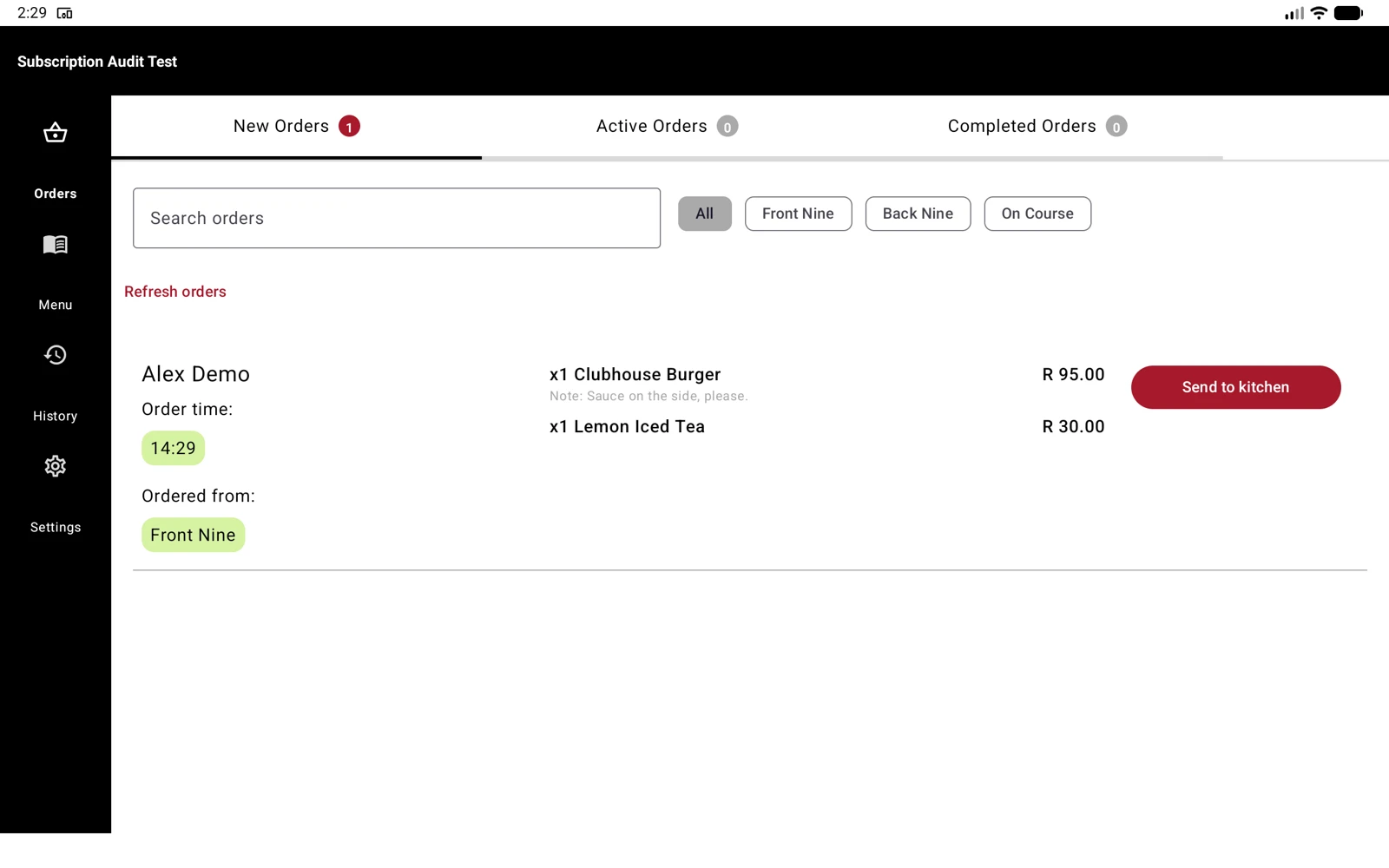
The current source and recorded app use these distinct states:
| Stored state / queue | Staff action | Next state | Meaning |
|---|---|---|---|
| New | Send to kitchen | Active | Preparation has started |
| Active | Complete Order | Completed | Preparation is finished |
| Completed | Complete | Complete | Handoff is finished; removed from live queues |
| Complete | View in History | Complete | Historical order retained |
“Completed” and “Complete” are different states. Do not collapse them in training or demonstrations. “Ready for collection” may explain the Completed phase in marketing, but it is not the current Android queue label. Payment should not be inferred solely from a preparation status.
Keep any demonstration course identifiable as test data. Do not present test menu prices, customer names or counts as commercial proof.
Golfer web ordering
Course identity leads. A golfer scans a QR code or opens a course link, browses the menu, selects items and available options, reviews the basket and places the order. No golfer account or app installation is needed in the current flow.
Use “basket” consistently. Base menu prices and selected-option surcharges must remain distinct. Keep the total visible and explain that payment is made at the venue. Never imply online payment was collected.
The course can configure golfer checkout details, including required or optional fields. Do not describe every course as asking for the same fixed details. Orders preserve submitted detail labels and values for historical display.
Recommended action copy: “View basket”, “Add to basket”, “Confirm & place order” and “View order”. Success copy should identify the next step. Error copy should state what failed and how to retry; never claim success before the order has been saved.
Respect mobile safe areas. Keep checkout reachable above the browser’s bottom controls. Provide visible labels, keyboard focus, error text and reduced-motion support. Use an image fallback when a menu image is unavailable; do not invent food imagery for a specific venue item.
Client website and imagery
Lead with the outcome for the club: smoother ordering at the turn. Explain the browser/Android split, show real product footage, disclose billing periods and provide a direct installation enquiry route.
The September website uses an original AI-generated golf halfway-house photograph as atmosphere, not evidence of a customer installation. The supplied logo is unchanged. Product recordings are real screen captures using the authorised test course; editing removes waiting time and adds instructional captions.
Avoid invented testimonials, customer logos, usage numbers, service-speed guarantees and unsupported claims of POS integration, online payments, staff roles or analytics. Do not copy aspirational subscription-screen bullet points into marketing unless the relevant capability is verified.
The installation form prepares an email for the visitor to review and send. It must say that no message has been sent automatically. Prices come from OrderInOne-Info-Web/site.config.json, which also drives visible copy and structured data. Commercial prices are not identity tokens.
Search and answer clarity
Use plain, crawlable HTML to answer who the product serves, what it does, how it works, what it costs and how installation begins. Use the same facts in visible content and structured data. Allow search crawlers, provide a sitemap and canonical URLs, and include a transcript with the demonstration video.
This creates a discoverable source for Google, ChatGPT, Grok and Claude. It is not a ranking or citation guarantee. llms.txt is supplementary and is not required by Google. No special Grok crawler name is assumed without official documentation.
Accessibility and handoff
Target WCAG 2.2 AA: 4.5:1 for normal text, 3:1 for large text, labels beyond colour, visible keyboard focus, clear form instructions and usable layouts at 200% enlargement. Test actual rendered colours and controls; a palette alone does not establish conformance.
Before publication, confirm the intended marketing domain, enquiry email, subscription prices and tax wording. Verify the Hosting target is a separate marketing site. Review the latest video and its captions. Do not present local build success as production deployment.
Source and decision record
Observed on 12 September 2026: Android ui/theme/Colour.kt, docs/ORDER_STATES.md, ui/pages/menu/dialogs/AddMenuItemPanel.kt; web tailwind.config.js, HalfwayProvider.tsx, golfer-field helpers and order-status components. The authorised test course supplied the menu and order recording. Current working-tree changes in the Android and web repositories were preserved.
New editorial decisions: shared burgundy for new work, darker marketing hover, restrained serif headline accent, golf photo direction and the website layouts. Historical guide: docs/brand/OrderInOne_Brand_Guide.md (July 2026).
References: WCAG 2.2, Google AI search guidance, OpenAI crawlers, Anthropic crawler guidance, xAI web search.